
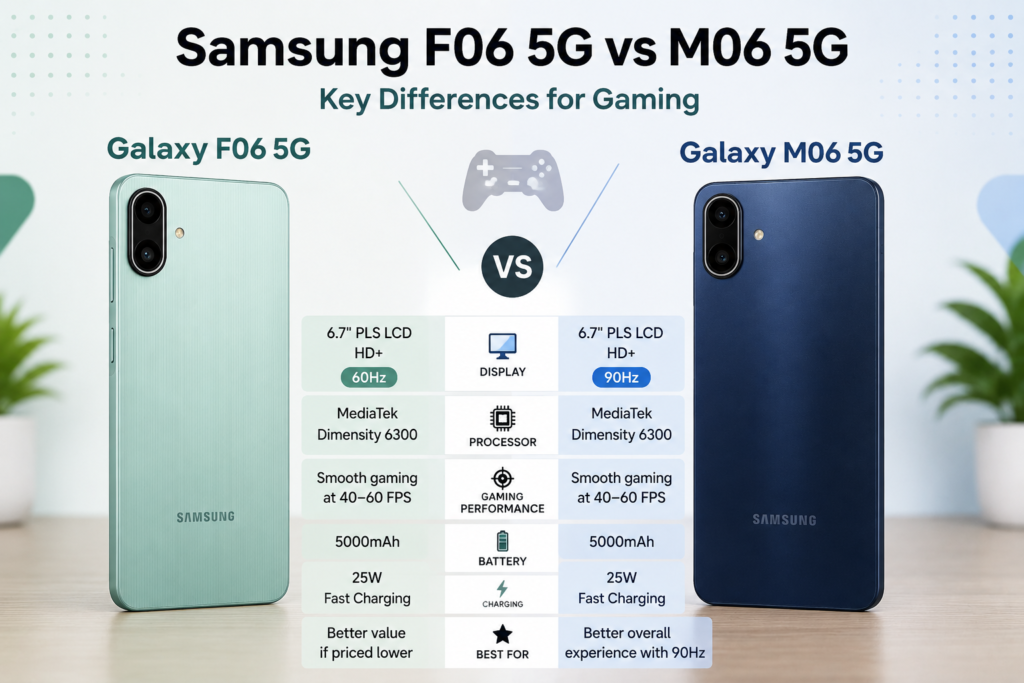
If you’re choosing between the Samsung Galaxy F06 5G and Galaxy M06 5G for gaming, the two phones look very similar on paper because both use the MediaTek Dimensity 6300 and 5000mAh battery.
The more interesting difference is the display: the Galaxy M06 5G has a 90Hz display, while the F06’s display is lower refresh rate.
So which one is actually better for gaming?
Quick Answer
The Samsung Galaxy M06 5G is the better choice for gaming if the price difference is small, mainly because its 90Hz display gives it an advantage for smoother system animations and supported games.
However, don’t expect the M06 to produce significantly higher BGMI FPS simply because it has a 90Hz screen. Both phones use the Dimensity 6300, so their core gaming performance should be broadly similar.
If your priority is simply getting a capable Samsung 5G phone for less money, the Galaxy F06 5G can still make sense.
Samsung Galaxy F06 5G vs M06 5G: Key Specifications
| Specification | Galaxy F06 5G | Galaxy M06 5G |
|---|---|---|
| Processor | MediaTek Dimensity 6300 | MediaTek Dimensity 6300 |
| RAM | 4GB / 6GB | 4GB / 6GB |
| Display | HD+ | HD+ |
| Refresh Rate | Lower than M06 | 90Hz |
| Battery | 5000mAh | 5000mAh |
| Charging | 25W | 25W |
| 5G | Yes | Yes |
| Main Camera | 50MP | 50MP |
| Gaming Focus | Budget gaming | Budget gaming |
Samsung itself positions both phones as budget devices capable of gaming and multitasking, with the same Dimensity 6300 platform.
Gaming Performance: F06 vs M06
The biggest thing to understand is that the processor matters much more for raw gaming performance than the display refresh rate.
Both phones use the MediaTek Dimensity 6300, so you shouldn’t expect one to suddenly deliver dramatically higher FPS than the other simply because it belongs to the M series.
The difference is mainly in how the gaming experience is presented.
The M06’s 90Hz display can make supported content and system interactions feel smoother. But a 90Hz display does not mean BGMI will automatically run at 90 FPS.
The actual FPS available in BGMI depends on the game’s device support, graphics settings and optimization.
Which Is Better for BGMI?
For BGMI specifically, I’d give the Galaxy M06 5G a slight advantage, but not because its processor is faster.
Both phones use the same Dimensity 6300, so the underlying processing hardware is very similar. Samsung also specifically markets the F06 for mobile gaming, while its M06 gaming messaging focuses on responsive gaming and the same Dimensity 6300 platform.
The M06’s 90Hz display is the main differentiator.
But if BGMI doesn’t offer a higher frame-rate option for the device, the display alone won’t create additional FPS.
So think of it this way:
Same chipset → similar raw gaming capability
90Hz display → potentially smoother visual experience on M06
BGMI FPS support → depends on the game, not just the display
Does 90Hz Make the M06 Faster for Gaming?
Not necessarily.
A higher refresh-rate display can display more frames, but the phone still needs enough processing power and game support to generate those frames.
For example, if BGMI is running at 60 FPS, a 90Hz display doesn’t turn that game into 90 FPS.
This is the same reason you shouldn’t judge a gaming phone purely by its refresh rate.
If you want to understand the difference between display refresh rate and actual game FPS, see our guide on whether a 120Hz display actually means 120 FPS in BGMI.
F06 5G vs M06 5G: Battery and Long Gaming Sessions
There’s very little separating the two here.
Both phones have a 5000mAh battery, and Samsung lists 25W fast charging for the devices.
That means battery capacity shouldn’t be the deciding factor between them.
Actual gaming battery drain will depend on factors such as:
- FPS setting
- Graphics quality
- Screen brightness
- Network conditions
- Temperature
- Background applications
- Gaming duration
So don’t assume that one phone will automatically last longer during BGMI simply because it belongs to the F or M series.
Which Has Better Gaming Value?
This depends heavily on the price difference.
Choose Galaxy M06 5G if:
- You want the smoother 90Hz display.
- The price difference is small.
- You want a slightly more gaming-oriented display experience.
- You plan to use the phone for more than just BGMI.
Choose Galaxy F06 5G if:
- It is significantly cheaper.
- You mainly want basic BGMI gaming.
- You don’t care about the higher refresh rate.
- You want the same Dimensity 6300 platform for less money.
The F06 is not automatically a worse gaming phone just because it has a lower-refresh-rate display.
F06 vs M06: What Actually Matters for Gaming?
If we rank the important factors, the comparison becomes much clearer:
1. Processor/GPU
Both phones use the Dimensity 6300, so there isn’t a major advantage here.
2. BGMI FPS Support
This matters more than the refresh-rate number printed on the specification sheet.
3. Thermal Performance
Long-session performance can differ depending on cooling and software behaviour. This needs actual testing rather than being assumed from specifications.
4. Display Refresh Rate
The M06 has the advantage here with its 90Hz display.
5. RAM
Both are available with 4GB and 6GB configurations, so RAM isn’t a major differentiator between the two models.
But RAM capacity doesn’t necessarily translate into higher FPS; see our guide on whether more RAM actually increases FPS in BGMI.
Samsung Galaxy F06 5G vs M06 5G: Final Verdict
The Galaxy M06 5G is the better gaming pick between the two, but the difference isn’t huge.
Both phones share the same Dimensity 6300 processor and 5000mAh battery, so their underlying gaming capability should be broadly similar.
The M06 gets the advantage because of its 90Hz display, which can provide a smoother overall experience.
But don’t make the common mistake of assuming:
90Hz display = 90 FPS in BGMI
That’s not how it works.
If the F06 is considerably cheaper, it may actually offer the better value because you’re getting essentially the same core chipset platform.
For gaming experience: M06 5G
For value: F06 5G if considerably cheaper
For raw chipset performance: Essentially tied
For display smoothness: M06 5G
Before You Compare Their BGMI Performance
We haven’t tested the Galaxy F06 5G and Galaxy M06 5G side by side under the same BGMI conditions yet. So while their hardware specifications suggest broadly similar gaming performance, we can’t claim that one delivers better FPS stability, heating control or battery drain without controlled testing.
For now, the M06’s 90Hz display gives it an advantage in display smoothness, while the F06 can make more sense if it is significantly cheaper. A final gaming-performance verdict should be based on actual testing rather than specifications alone.
What Should You Choose: F06 5G or M06 5G?
The choice comes down to what you value more: display smoothness or price.
If both phones are available at nearly the same price, the Galaxy M06 5G is the more sensible gaming choice because its 90Hz display gives it an advantage in overall visual smoothness.
If the Galaxy F06 5G is noticeably cheaper, however, its lower price can make it the better value. You are still getting the same Dimensity 6300 platform, so you’re not giving up a major amount of raw processing capability just by choosing the F-series model.
For BGMI, neither phone should be chosen purely because of its series name. The actual BGMI FPS support, thermal behaviour and long-session stability matter more.
If you’re considering another budget Samsung phone for BGMI, see whether the Samsung Galaxy F15 can run 60 FPS in BGMI.
Between the Samsung Galaxy F06 5G and Galaxy M06 5G, I’d pick the M06 5G for gaming if the price difference is small.
Its 90Hz display gives it the more attractive overall gaming and everyday-use experience, while both phones share the Dimensity 6300 platform.
However, the F06 5G becomes the better value option when it is significantly cheaper.
Most importantly, don’t confuse a higher display refresh rate with higher BGMI FPS. A 90Hz display doesn’t guarantee 90 FPS in BGMI.
M06 5G: Better overall gaming experience
F06 5G: Better value when cheaper
Raw chipset: Essentially tied
Display smoothness: M06 advantage
Confirmed FPS stability: Requires side-by-side testing
F06 5G vs M06 5G: Which One Should Gamers Buy?
Buy the Galaxy M06 5G if:
- You prefer a 90Hz display.
- The price difference is small.
- You want smoother scrolling and supported content outside gaming as well.
- You plan to use the phone for gaming and everyday entertainment.
Buy the Galaxy F06 5G if:
- You find it at a significantly lower price.
- Your gaming is mostly casual.
- You don’t consider a higher refresh-rate display essential.
- You want the Dimensity 6300 platform without paying extra for the M-series model.
The Bigger Difference Is Not F Series vs M Series
It’s easy to assume that Samsung’s F Series or M Series is automatically better for gaming.
That’s not really how Samsung’s lineup works.
A phone’s gaming performance depends much more on its chipset, GPU, thermal management, RAM, software optimization and supported game settings than the letter attached to the model.
That’s why a particular F-series phone can outperform an M-series phone, while another M-series phone can be better than an F-series model.
If you want to understand the broader differences between Samsung’s lineups, see our guide on which Samsung series is best for gaming: A, M, F or S.
FAQs
Is Samsung F06 5G good for gaming?
The Galaxy F06 5G has the Dimensity 6300 chipset, which makes it capable of handling casual gaming. However, its actual BGMI FPS stability and long-session performance should be judged through testing rather than specifications alone.
Is Samsung M06 5G good for BGMI?
The Galaxy M06 5G has the same Dimensity 6300 platform as the F06 5G and adds a 90Hz display. It can be considered for casual BGMI gaming, but the 90Hz display does not automatically mean BGMI will run at 90 FPS.
Which is better for gaming, Samsung F06 or M06?
The M06 5G has the edge because of its 90Hz display, while the F06 5G can offer better value if it is significantly cheaper. Their core chipset platform is the same.
Does Samsung M06 5G support 90 FPS in BGMI?
A 90Hz display does not automatically mean that BGMI supports 90 FPS on the phone. The available frame-rate options depend on BGMI’s device-specific optimization and support.
Does Samsung F06 5G have a better processor than M06 5G?
No. Both phones use the MediaTek Dimensity 6300, so there is no major chipset advantage for either model.
Is 90Hz better than 60Hz for BGMI?
A 90Hz display can provide a smoother visual experience, but it does not automatically increase BGMI’s FPS. The game must support the relevant frame-rate option on the device.
Which Samsung phone is better for gaming, F Series or M Series?
Neither series is universally better for gaming. The specific phone’s chipset, GPU, thermal management, display and BGMI support matter more than whether it belongs to the F or M Series.